Upgrade - How to convert Silver to Gold or Platinum. How to convert Trial to a full version. How to enter a new serial number to upgrade. Instant upgrade purchase. Upgrading a currently installed version of VersaCheck.
Instant upgrade of same year software.
A version of VersaCheck (same version as the new serial number) must be installed on your computer and not be expired. These instructions apply to the Trial version as well.
You cannot upgrade the Free X1 PRESTO program in this manor. You must to a complete install.
For complete installation instructions:
http://www.versacheck.com/web/support/article.aspx?id=810
You MUST run Versacheck "As Administrator" to change the serial number. Right Click on the Versacheck icon and select "Run As Administrator"
After Versacheck opens, follow the directions below to change your version into your new version.
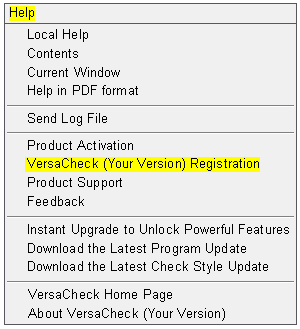
1. Select Help from the top tool bar.
2. Select VersaCheck [your version] Registration (see picture below).
Image 1
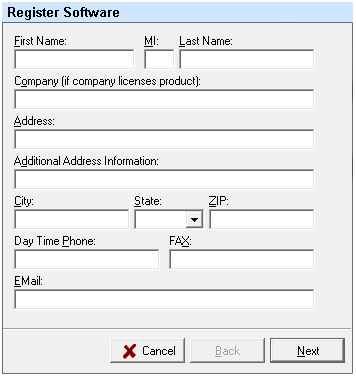
3. Fill out the first screen in registration, make sure you enter the email, address, name, and phone number you used when ordering your product from us (see image below). Doing this will ensure the product serial number can be accessed in the future if you misplace it. When complete select Next.
Image 2
4. On the second screen you will want to click in the Serial Number field and delete the serial number that is currently displayed (see image below). Using capitol letters and the "-" type in your new serial number.
Image 3
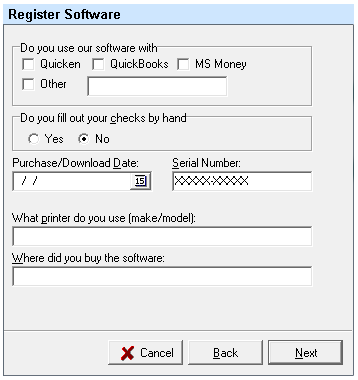
5. Select Next once this is complete.
6. Choose to register the product by internet.
Image 4
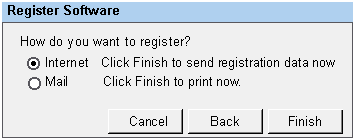
7. Select Finish.
8. After the registration has gone through the internet or you have printed the mail in slip, close Versacheck.
9. Re-open the Versacheck program. You will be asked to activate the product. Complete this by internet or phone and select Finish when complete.
10. Once the window is closed for activation you will have the full/new version of the software you purchased.