Error Message - Exception 'CMicrLineParseException' in module VCheck.exe at 001DA6B4 An amount field was detected. Entering an amount field makes the check useless. You may be trying to use a 'counter' check as a sample check, which will not work. Please use a blank preprinted check to set up this checkbook.
This an error that has been fixed with an update, please do the following:
1. Close any VersaCheck windows that may be open.
2. Click on your Start button and Select Programs or All Programs
3. Navigate to and open the VersaCheck folder.
4. Skip down to your operating system and follow the instructions.
Image 1

WINDOWS XP:
A. Click on the "Check For Updates" option and allow the update to run.
Image 2

WINDOWS VISTA OR WINDOWS 7:
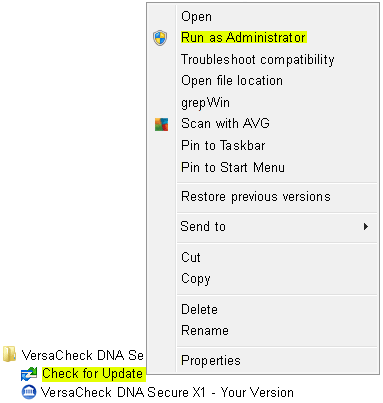
A. Right click on the "Check for Updates" option and select "Run As Administrator.
B. Select the allow or yes option when asked by the UAC and allow the update to complete.
Image 3
NOTE: The download screen will disappear when complete. Simply reopen the program, the error will not appear again.