Checksoft Home & Business is designed to meet basic accounting needs and allows users to write and print checks.
Checksoft includes many practical features for check writing, including customizable templates and compatibility
with other finance applications at a budget-friendly price.
The application's interface is very user friendly and offers smooth navigation from one item to the next.
Although not as user-friendly as VersaCheck, Checksoft has bookkeeping functions and check writing abilities
that other check writing software applications do not have.
CheckSoft Home & Business includes numerous check design templates and creates an easy way for you to create a
personalized template... providing for printing of the MICR line.
You can create a completely tailored check by customizing fonts and importing logos or other graphics.
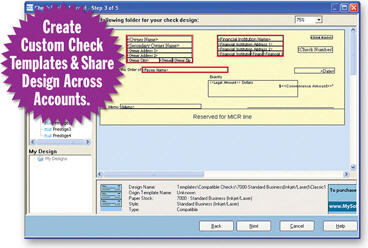
Once you have chosen a check design, the checking account information is automatically applied to the template fields
except for the "Pay to the Order of" field where you can insert a text box and type in the information.
You can also see how your check will look in Print Preview before printing.
You will need to purchase check stock (available from VersaCheck.com, office superstores and online stores)
and a MICR (magnetic) toner or ink cartridge to print checks.
Choose from more than 100 check templates or create your own.
Enter your account data then select the check design and paper stock that fits your needs.
Powerful check designer lets you customize your check with more than 1,000 colorful background images,
logos, graphics, and 10,000 fonts.
Print filled-in checks in one quick step or print blank checks to fill out by hand.
Works with Quicken®, QuickBooks®, and Microsoft® Money.
FEATURES:
- Save Money – Save up to 80% on check paper costs
- Efficiency – Create and print checks for multiple accounts
- Reduce Risk – Safeguard personal information
- Checks on Demand – Never run out of checks
- Financial Control – Manage your finances from one place