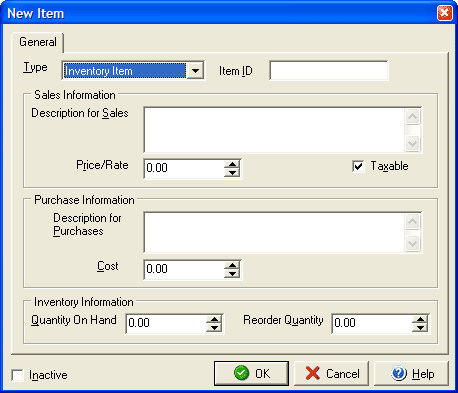
The Type drop down menu will allow you to select what type of item to create (e.g., an inventory item, service, etc.). Use the Item ID field to give each item it's own unique ID.
In the Sales Information section enter a sales description of the item and price for the item or service. If the Taxable check box is checked then the item will have sales tax generated for it whenever it is added to invoices and estimates.
In the Purchase Information section (for inventory items only) the Description for Purchases section will automatically duplicate the description from the sales section, although you can manually add to or edit the description. Enter the your cost per item in the Cost field.
In the Inventory Information section (for inventory items only) you can enter the quantity of the item that you currently have on hand and at what quantity the item needs to be reordered. VersaCheck will automatically track the inventory by decreasing the quantity on hand as the item is added to invoices. Clicking the Inactive button will keep the item in the Item List but will prevent it from showing up as an item to add to invoices or estimates.