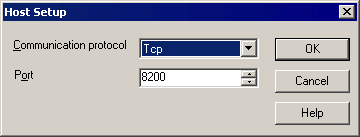
ActiveCheck™ Service Host Setup
The ActiveCheck™ Service Host Setup allows you to select which Communication
Protocol the service will use with the client machines and what port to receive
incoming communication.
There are two option for communication protocol available in VersaCheck ActiveCheck™: Tcp or Http. Use the Communication protocol drop down menu to select an option. If you use firewall hardware or software or you have specially configured network settings, you can change the port that the VersaCheck ActiveCheck™ service listens on by entering which port to use in the Port field.