Check Page Setup
Bands Tab
The Check Page Setup dialog box allows you to set up what type and style of paper you will be
printing your check on. While in the Professional Check Designer mode, select Page Setup
from the main Check Designer File menu.
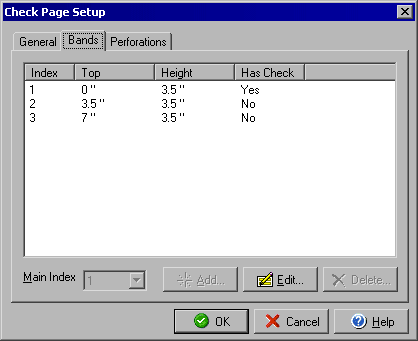
By selecting the Bands tab you can view the location and size of each section or band, and whether or not that band contains a check. If you selected "custom" in the Style field under the General tab you will be able to edit or add new bands by clicking the Add or Edit buttons.
By clicking the General tab you can select the type of check, and by clicking the Perforations tab you can view where vertical perforations, if any, will be located.
|
||||||
| Personal Express | American Checkbooks |
Personal Premier | Home & Business | Platinum | ||
 |
|
|
|
 |
||